
What Are Dielines in Packaging? How to Use Dieline Templates for Custom Boxes
What Are Dielines in Packaging? How to Use Dieline Templates for Custom Boxes
When it comes to creating custom packaging, one of the most important (yet often overlooked) aspects of the design process is the dieline. If you’ve ever wondered “What are dielines in packaging?” or “Why do I need a dieline template for custom boxes?”—this guide is for you.
At Hola Custom Boxes, we work with businesses to transform dielines into professional, high-quality packaging designs that not only protect products but also make brands unforgettable.
What Are Dielines in Packaging?
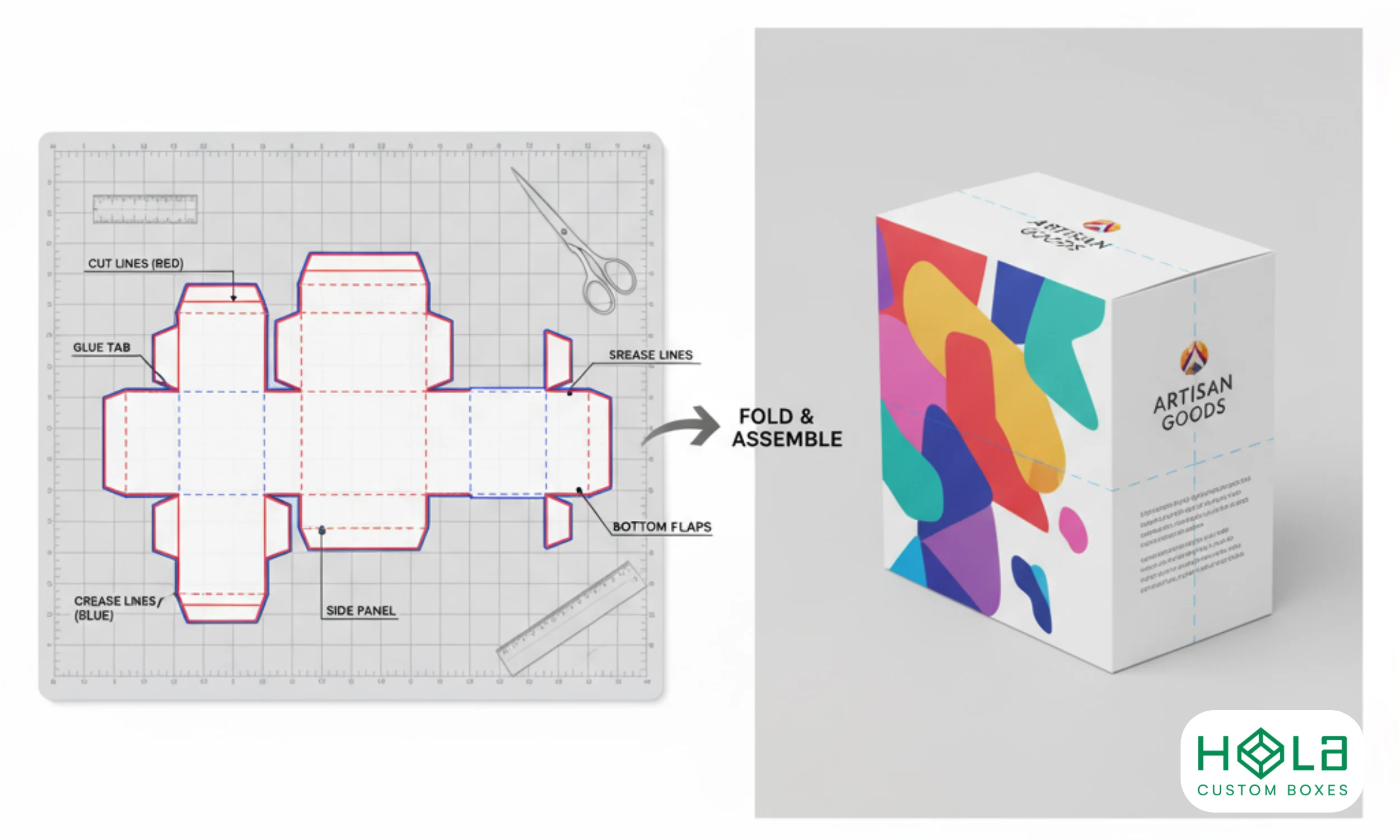
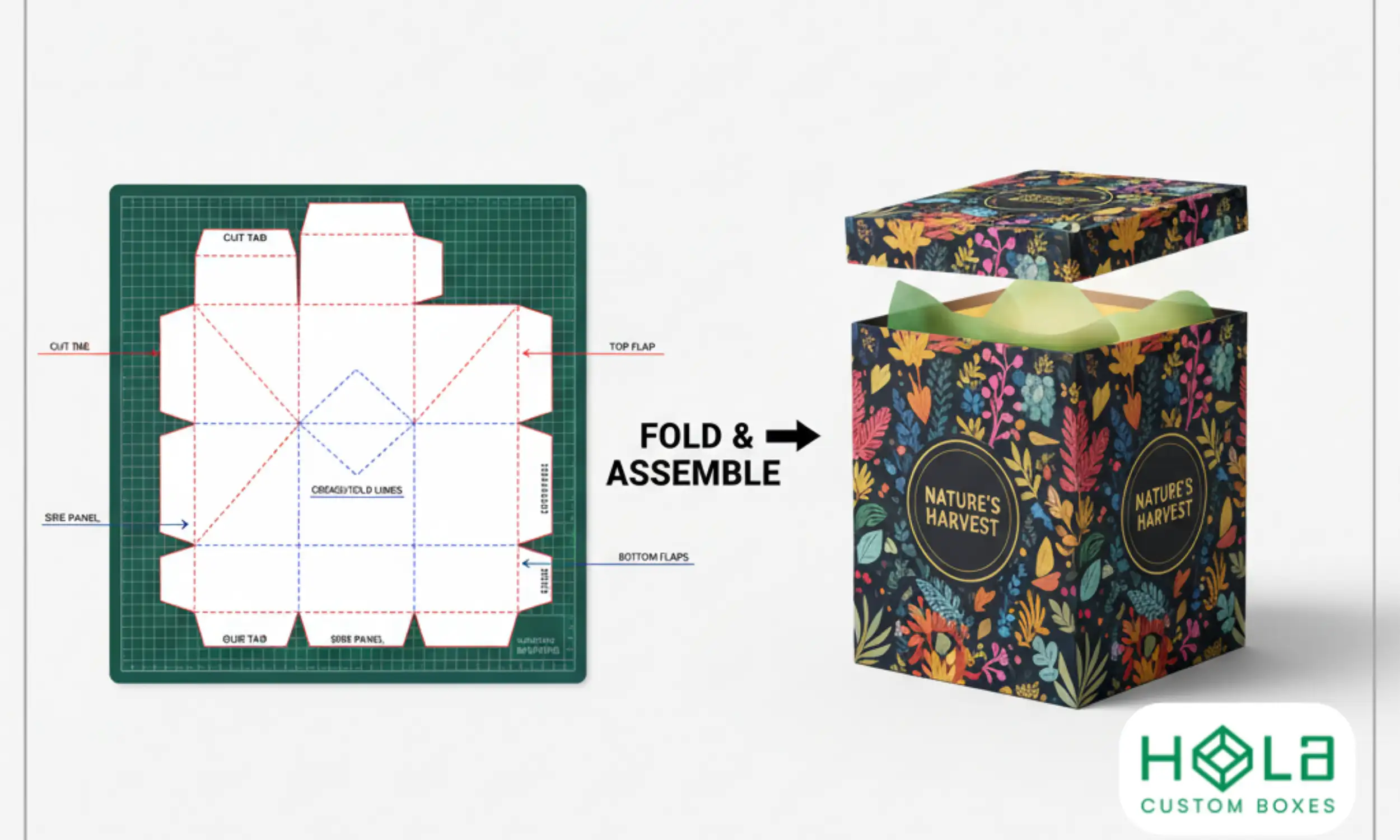
In packaging design, a dieline is a flat, 2D template that shows where a box will be cut, folded, and glued. Think of it as a blueprint for your packaging.
A dieline includes:
Cut lines – where the packaging will be trimmed.
Fold lines – where the box will bend into shape.
Bleed areas – extra space to ensure printing extends to the edge.
Safe zones – areas where logos, text, or images should stay to avoid being cut off.
Without an accurate dieline, your packaging design may not fit correctly, leading to wasted time, material, and money.
Why Are Dielines Important in Packaging Design?
1. Ensures a Perfect Fit
A dieline guarantees your box is structurally sound and that your product fits securely.
2. Avoids Printing Errors
Printers rely on dielines to align designs properly. Without them, logos or text could be misaligned.
3. Saves Time and Money
Having a dieline template avoids costly mistakes, revisions, and material waste.
4. Professional Look
Custom packaging with precise dielines ensures your boxes look polished and branded—not sloppy or inconsistent.
How to Read a Dieline Template
If you’ve seen a dieline file, it probably looked like a puzzle of lines, shapes, and colors. Here’s how to decode it:
Black lines → Cut lines
Blue/green lines → Fold/score lines
Red lines → Bleed lines (extra space for printing beyond the edge)
Dotted lines → Glue or overlap areas
Most dielines are created in design software like Adobe Illustrator, but your packaging supplier (like Hola Custom Boxes) will usually provide a ready-to-use dieline template.
How to Use Dieline Templates for Custom Boxes
Step 1: Choose Your Box Style
Each box style (e.g., reverse tuck end, mailer, rigid, pillow box) requires its own dieline.
Example: If you’re designing custom printed pillow packaging boxes, your dieline will look different than for a corrugated mailer box.
Step 2: Place Your Branding Elements
Import the dieline template into your design software. Then add:
Logo placement
Product details
Graphics and patterns
Finishing elements (foil stamping, embossing, spot UV, etc.)
Step 3: Respect Bleed and Safe Zones
Extend background colors/images into the bleed area.
Keep text and logos within the safe zone so they don’t get cut off.
Step 4: Double-Check Panel Orientation
Remember that when folded, the top, bottom, and side panels will face different directions. Double-check so your design isn’t upside down.
Step 5: Send to Production
Once finalized, the dieline is sent to your packaging manufacturer for cutting and folding into physical boxes.
Common Mistakes When Using Dielines
Placing important text outside the safe zone.
Forgetting to extend backgrounds into the bleed area.
Misaligning graphics across folds.
Designing without checking the final 3D view.
Examples of Packaging That Rely on Dielines
Custom Cosmetic Boxes – ensures logos align with front panels.
Custom Coffee Boxes – requires perfect fit for bags or jars.
Custom Soap Boxes – with die-cut windows or sleeves.
Luxury Rigid Boxes – with multiple folds, inserts, and specialty finishes.
Explore more in our Custom Packaging Collection.
FAQs About Dielines in Packaging
Q1: Who creates dielines for packaging?
Most dielines are provided by packaging suppliers, though graphic designers can also create them.
Q2: Do I need design software to use a dieline?
Yes. Programs like Adobe Illustrator are typically used. But you can also work with a supplier like Hola Custom Boxes to place your design.
Q3: Can I request a dieline for free?
Many packaging companies (including Hola Custom Boxes) provide dieline templates when you request a custom quote.
Q4: What file formats are dielines in?
Common formats include AI, PDF, and EPS.
Q5: What happens if my dieline isn’t accurate?
Your packaging may not fold correctly or your artwork may be misaligned. Always review with your supplier before production.
Conclusion
Dielines are the backbone of successful custom packaging design. They ensure your boxes are cut, folded, and printed perfectly. By understanding dielines and using templates correctly, you can save money, avoid errors, and create packaging that truly represents your brand.
At Hola Custom Boxes, we provide accurate dieline templates for custom boxes to make the process simple, professional, and hassle-free. Whether you’re designing cosmetic boxes, food packaging, or retail displays, our team ensures every fold and cut is exactly where it should be.
Need a dieline for your next packaging project? Contact us today and get started with your custom packaging design.


